OtO 1.5 - A New Era of Flexibility
After months of development and countless conversations with our community, we’re thrilled to unveil OtO 1.5.3, our most ambitious update yet. This release marks a significant milestone in our journey to make teleprompting and presentation control more powerful, flexible, and adaptable than ever before. From a groundbreaking extension system to enhanced AI capabilities and refined user experience, version 1.5.3 brings a wealth of new possibilities that will transform how you work with OtO.
The Extension System: Opening New Horizons
Perhaps the most exciting addition in this release is our brand-new extension system. We’ve fundamentally reimagined how OtO can connect with the broader ecosystem of professional tools, starting with a powerful integration for broadcast environments.
MOS Extension: Bridging OtO and Broadcast Newsrooms
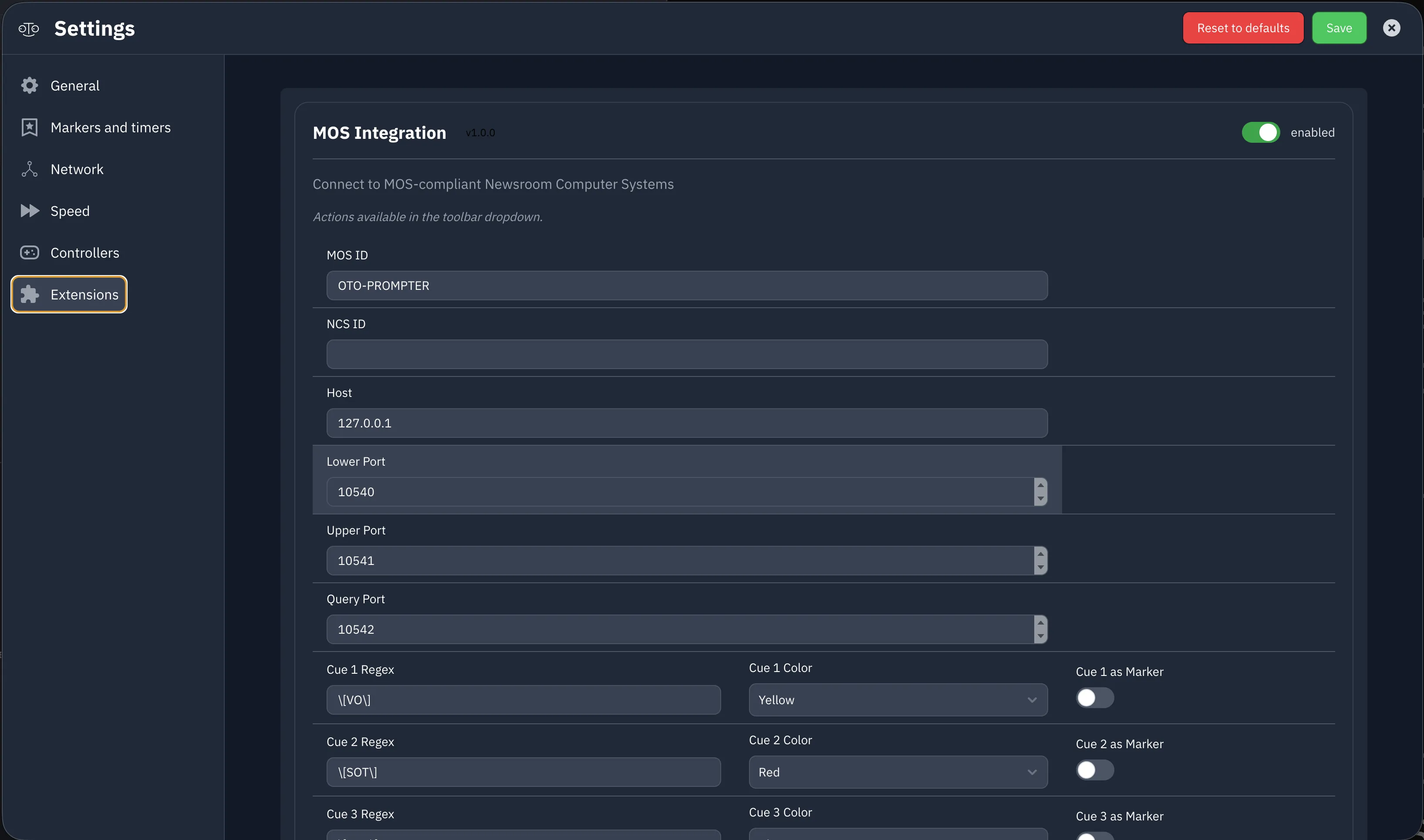
Our first extension introduces comprehensive MOS (Media Object Server) protocol support, enabling seamless integration with television and broadcast newsroom systems, creating a truly unified workflow for media professionals.
When connected to your newsroom system via MOS, OtO now automatically retrieves scripts, cues, and rundowns directly from the broadcast infrastructure. Text is automatically fed into your teleprompter with intelligent formatting preserved, and MOS-specific cues arrive with enhanced marker options that let you customize how each element appears and behaves. Whether you’re working with iNews/MediaCentral, News Works, Octopus or other MOS-compliant systems, the integration feels natural and instantaneous.
The formatting engine has been significantly enhanced to handle broadcast-specific styling requirements. MOS cues maintain their semantic meaning while gaining additional control options within OtO’s unique marker system.
An SDK on the Horizon
This is just the beginning. We’re actively developing a comprehensive Software Development Kit (SDK) that will empower developers to build your own extensions and integrations, to create custom connectors, import workflows, and automation tools that extend OtO’s capabilities in ways we haven’t even imagined yet.
What would you like to see next? Everything from extensions for cloud storage providers to project management tools or specialized broadcast equipment, the future SDK will get you covered! Which integrations would make your workflow smoother? Which external services should OtO speak to? Drop us a line with your ideas, your input will directly shape our extension roadmap.
Macros: Orchestrating Complex Actions with Ease
One of the most requested features has finally arrived: the Macros system for Action Markers. This elegant solution lets you group multiple Action Markers together and trigger them simultaneously with a single command.
Picture this: you’re live on stage and need to trigger an audio jingle, advance a PowerPoint slide, and play a secondary sound effect all at the exact same moment. Previously, this required a quite complex syntax in the marker naming. Now, you simply assign these actions to a macro marker, and one trigger executes them all in perfect synchronization.
This opens up incredible possibilities for theatrical productions, live events, worship services, and corporate presentations. You can even nest macros within macros for sophisticated multi-layered automation!
AI Freedom: Choose Your Intelligence
We’ve overhauled how OtO handles artificial intelligence. Instead of being locked into a single provider, you now have the freedom to connect OtO to any OpenAI-compatible API endpoint.
This means you’re no longer constrained to choosing between Mistral and OpenAI. Simply configure your preferred openAI compatible endpoint, API key, and model parameters in the new AI settings panel.
This flexibility is particularly valuable for organizations with specific privacy requirements, those using custom-trained models, or anyone who simply prefers a different AI provider’s approach to text generation and analysis. The transcription features, script enhancement tools, and AI-assisted formatting all work seamlessly with whichever provider you choose.
For enterprise users, this also means you can connect OtO to internal AI infrastructure, keeping sensitive content entirely within your organization’s ecosystem while still benefiting from OtO’s intelligent features.
OtOview Android App: Modernized and Future-Ready
Our OtOview Android application — the companion app that turns any Android device into a remote teleprompter display — has received a comprehensive overhaul to support the latest Android versions and modern device architectures.
The app has been rebuilt with current Android SDKs, ensuring compatibility with Android 14 and beyond while maintaining support for older devices. Performance optimizations mean smoother scrolling, more responsive touch controls, and better battery efficiency during extended productions. We’ve also modernized the UI to align with current Material Design principles, making the interface feel fresh and intuitive on contemporary devices.
For productions relying on tablets or phones as secondary prompter displays, this update ensures your remote viewing setup remains reliable and performant for years to come. Whether you’re using budget Android tablets or flagship devices, OtOview now delivers a consistently excellent experience.
Refined Experience: UI Polish and Bug Fixes
Beyond the headline features, OtO 1.5.3 brings dozens of UI refinements and quality-of-life improvements that make daily use more pleasant and efficient. We’ve tightened spacing, improved contrast in dark mode, refined animation curves, and streamlined several workflows based on your feedback.
The marker management interface now offers better bulk operations, the script editor has enhanced syntax highlighting, and the controller configuration panel provides clearer visual feedback when mapping hardware inputs. Small touches like smoother scrolling physics, more responsive button states, and better error messaging add up to a noticeably more polished experience.
The result is a more stable, predictable platform that you can rely on during critical productions.
Getting the Update
OtO 1.5.3 is available now as a free update for all current subscribers. Simply restart your OtO application to trigger the automatic update, or download the latest version demo. The MOS extension requires an active Pro or Enterprise subscription, while macros and AI endpoint configuration are available to all users.
We’re incredibly proud of this release and can’t wait to see how you’ll put these new capabilities to work. As always, our team is here to help whether you need assistance configuring the MOS extension, setting up your first macro, or connecting to a new AI provider.